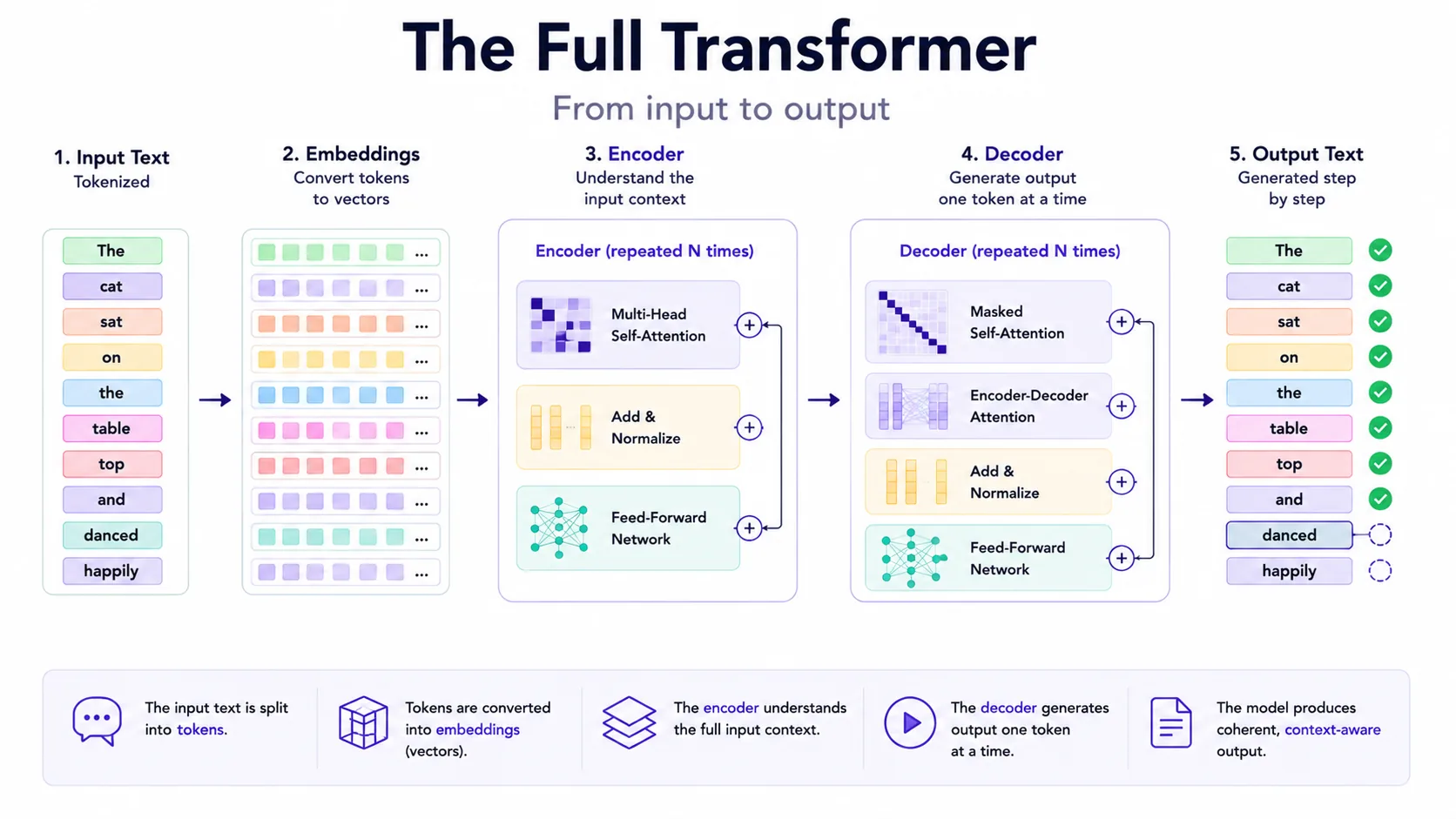
Transformer explained
The Transformer is the architecture behind many modern LLMs. Its key idea is to process tokens with attention layers so the model can weigh relationships across the context. This made training more parallelizable than older recurrent approaches and became a foundation for modern language models.
The technical request lifecycle
A production LLM request is usually a pipeline, not a single model call. The application validates the input, builds the prompt, retrieves context if needed, sends tokens to a model, optionally calls tools, checks the output and logs traces for later evaluation.
Combines system instructions, user input, memory, examples and policies into one ordered context.
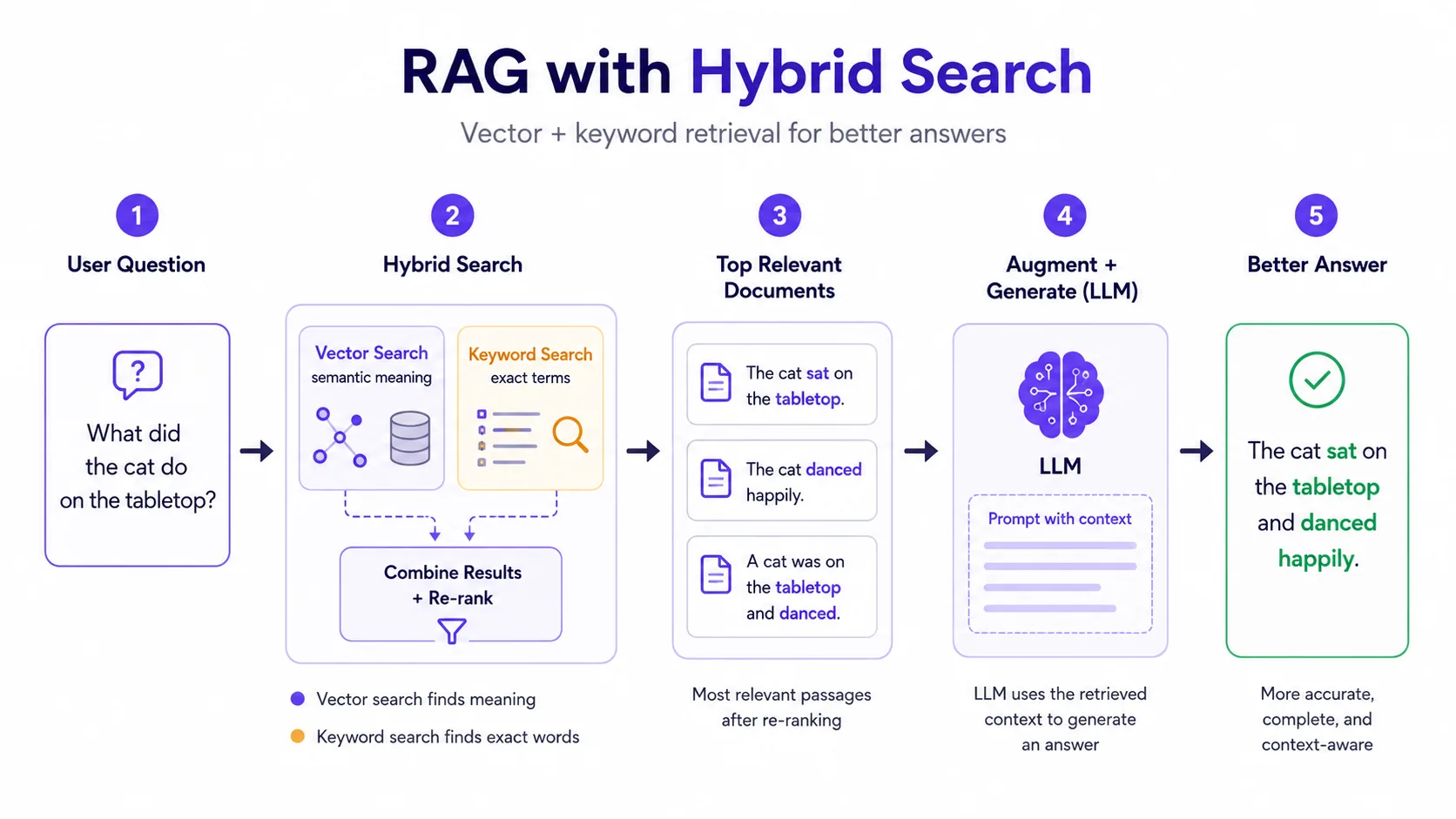
Optional step that searches a vector database or keyword index for relevant chunks. This is the core of Retrieval-Augmented Generation (RAG).
The model computes next-token probabilities. Decoding settings such as temperature influence how deterministic or varied the answer becomes.
The app may validate citations, schema, policy compliance or tool outputs before showing the response to the user.
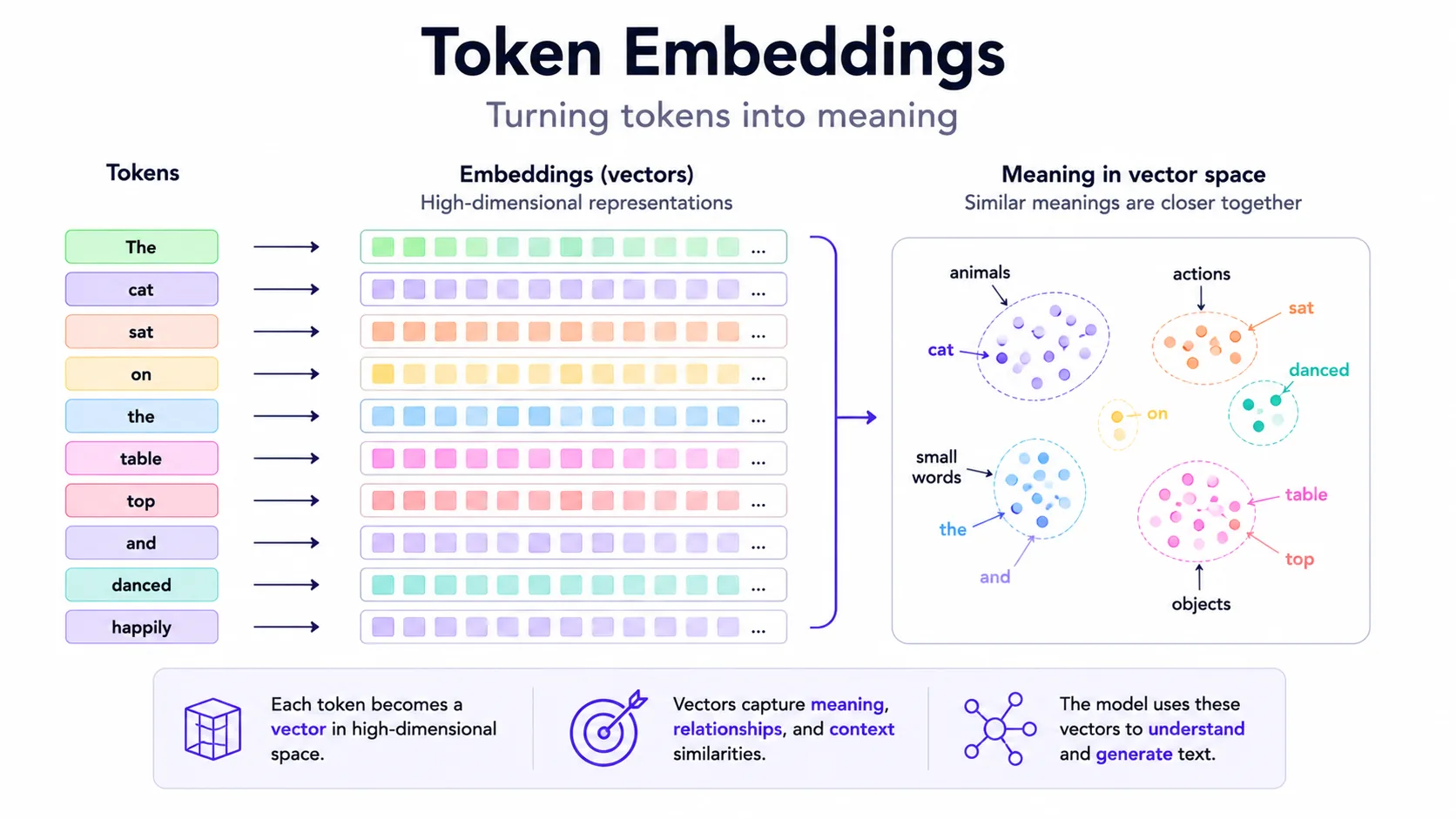
Embeddings explained
Embeddings are numeric vectors that represent text, images or other data in a space where similar meanings tend to be closer. They are useful for semantic search, clustering, recommendations and retrieval. The important detail: embeddings are not truth; they are similarity signals.
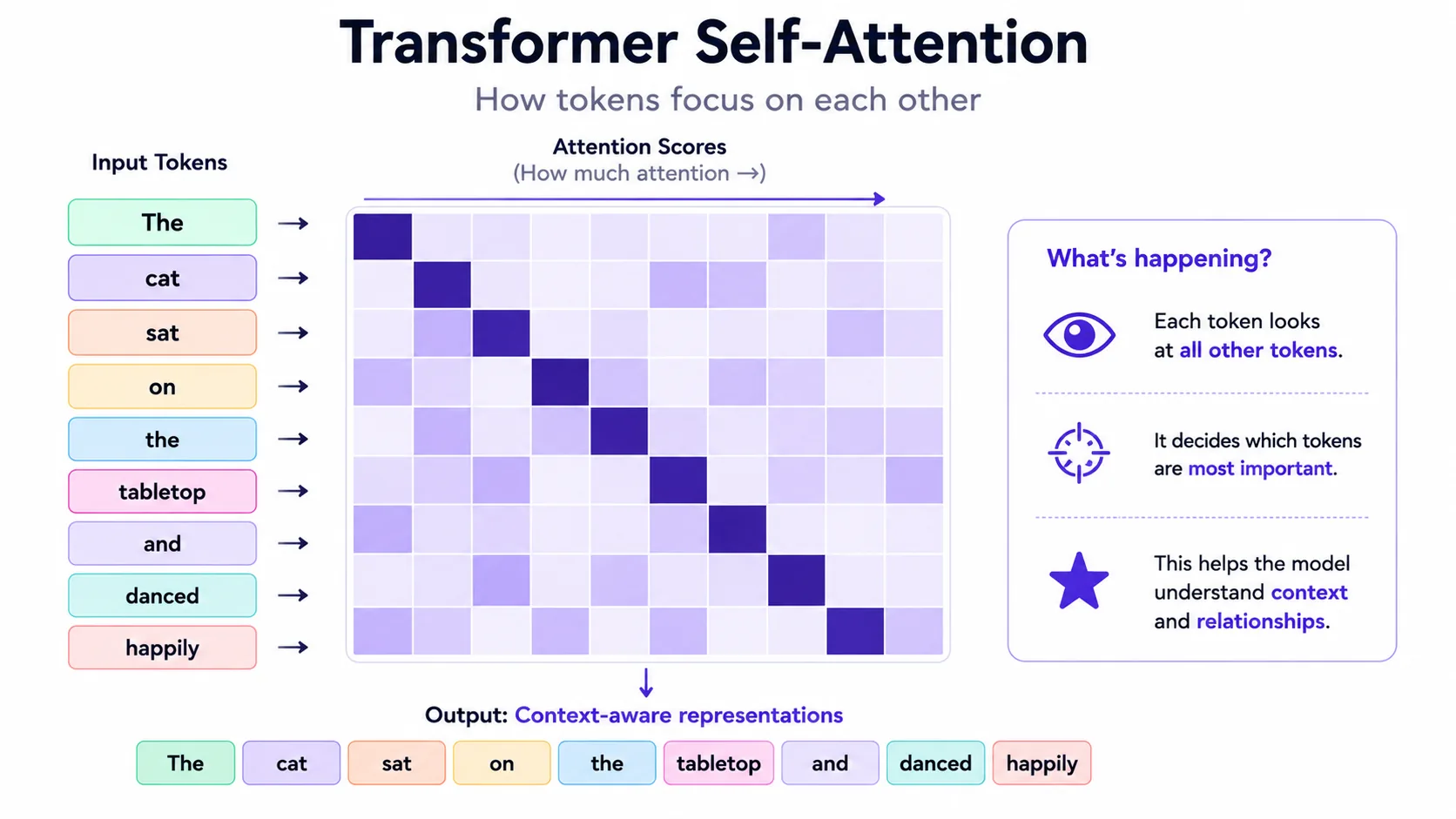
Self-Attention explained
Self-attention lets each token weigh other tokens in the same context. The model computes relationships repeatedly across layers, creating richer representations of words, phrases and dependencies. It is one reason LLMs can use long instructions and examples.
Tokenization deep dive
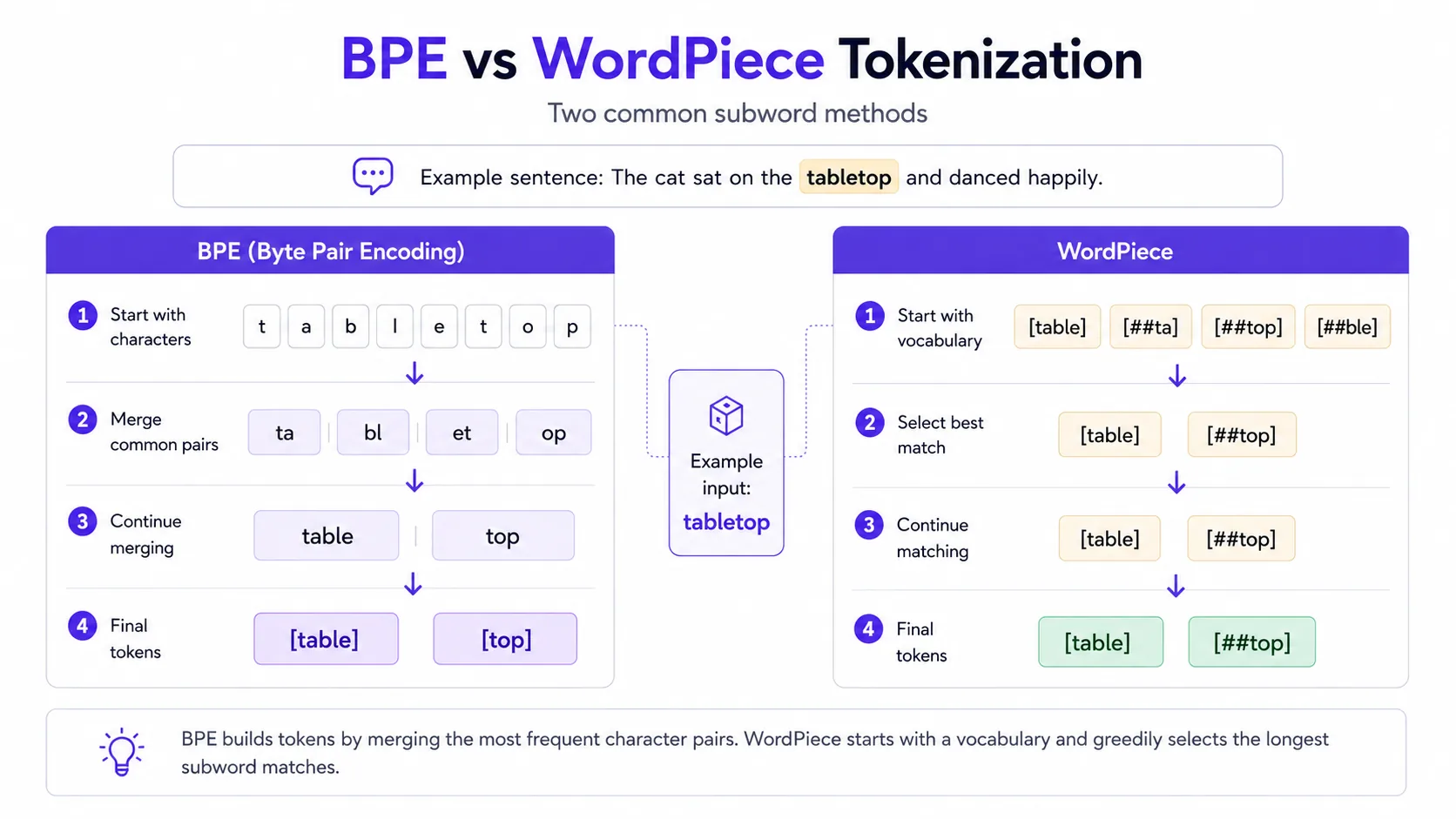
Tokenization converts text into model-readable units. Different languages and scripts can use tokens differently, which affects cost and context length. Tokenization also explains why exact character limits, code snippets and rare words can be tricky.
Retrieval-Augmented Generation (RAG) architecture
A production RAG system can include ingestion, chunking, embeddings, an index, retrieval, reranking, prompt assembly, answer generation, citations, and evaluation. Many failures originate before generation — for example poor chunks, stale documents, weak ranking, or missing access filters — while other failures arise during synthesis, citation, refusal, or answer generation.
Continue with security, evaluation, tools, agents, and the controls needed around real applications.
Prompt Injection
Prompt injection happens when untrusted text tries to override system or developer instructions. It is common in RAG and agent workflows because retrieved pages can contain hidden instructions. Treat external content as data, not authority.
Large Language Model (LLM) Evaluation
LLM evaluation measures whether outputs are correct, useful, safe and consistent. Use a mix of automated checks, model-graded rubrics, human review and task-specific tests. Track regressions over time, especially after prompt, model or retrieval changes.
Function Calling
Function calling lets a model return structured arguments for a tool instead of free text. The application then decides whether to call the tool, validate arguments and handle errors. The model should not be the security boundary.
Agents explained
An agent is an LLM-driven system that can plan steps, call tools, observe the results and decide what to do next — looping until a goal is reached or a stop condition is hit. Unlike a single prompt that returns one answer, an agent runs a cycle: reason, act, observe, repeat. This makes agents powerful for multi-step work, but also harder to evaluate, secure and keep predictable than a single request.
A practical agent usually combines four parts: a model that plans, a set of tools it can call (search, code execution, an API), a memory or scratchpad to track progress, and guardrails that decide which actions need human approval. The model is never the security boundary — the surrounding application validates every action before it runs.
Large Action Models (LAMs)
“Large Action Model” (LAM) is an informal industry label, not a single standardized architecture or universally separate model class. It usually describes a model or agent component optimized to choose and execute actions — such as calling tools, operating interfaces, or producing a sequence of software steps — rather than only generating explanatory text.
In practice, “LAM” and “LLM agent” are used inconsistently. A useful conceptual distinction is that the agent is the whole system — model, tools, memory or state, policies, execution environment, and approval steps — while “LAM” may refer to its action-selection component. Many production systems implement actions with an LLM plus tool calling, state management, and guardrails rather than a separately defined LAM architecture.
Multi-agent systems and tool protocols
As tasks grow, a single agent is often split into several specialized agents that collaborate: one plans, one retrieves context, one executes and one checks the result before anything is approved. This mirrors how a small team divides work, and it makes each part easier to test and govern than one agent that tries to do everything.
Open protocols are emerging for different integration layers. The Model Context Protocol (MCP) defines a client-server protocol for exposing tools, resources, and prompts to AI applications. The Agent2Agent (A2A) protocol focuses on discovery, communication, and task handoff between agents. They can be complementary, but support, security profiles, and adoption vary; using both is an architectural option, not a universal 2026 standard.
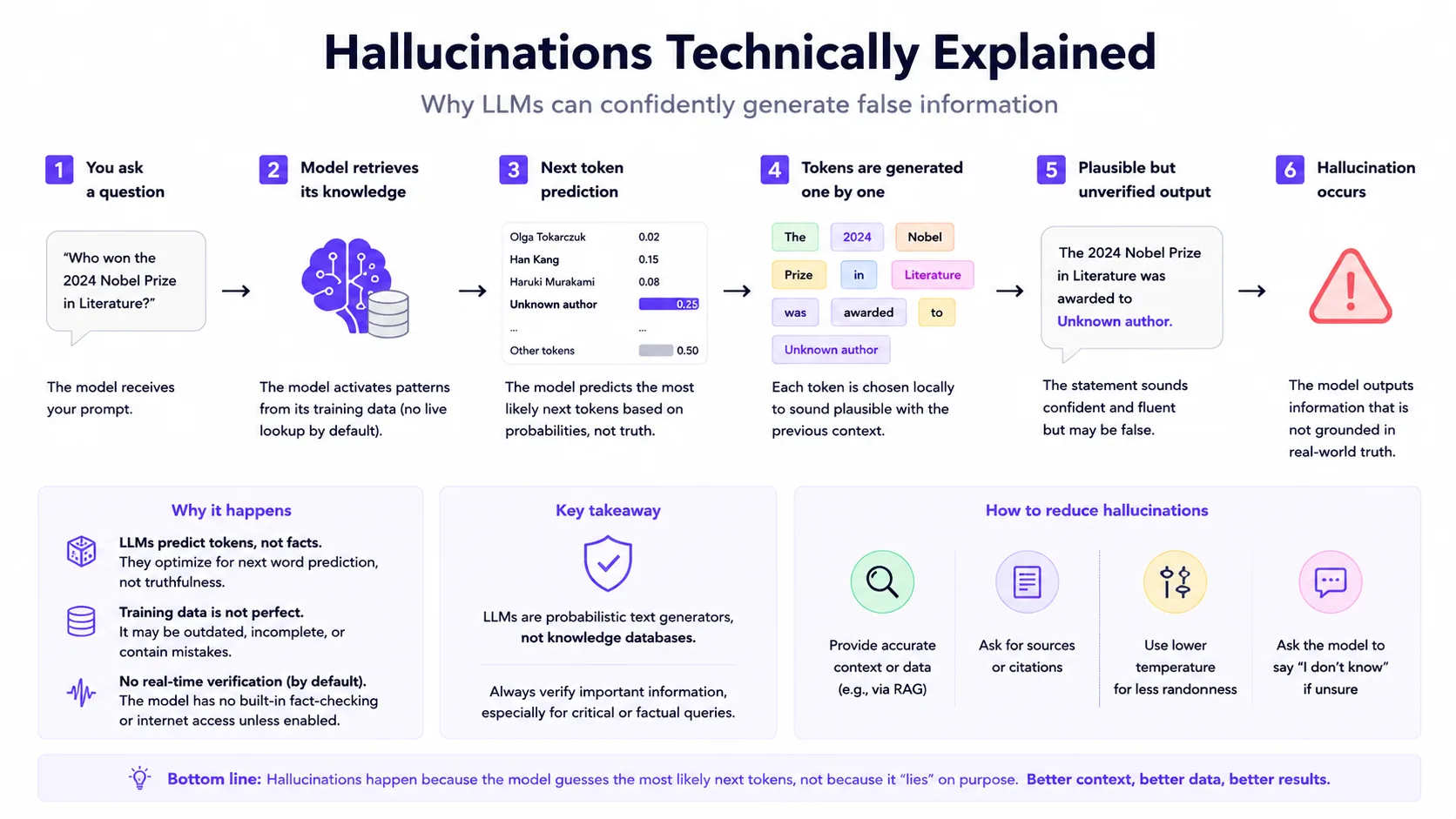
Hallucinations technically explained
Hallucinations arise from the gap between fluent generation and grounded verification. The model can produce likely text even when it lacks evidence, misreads retrieved context or overgeneralizes from training patterns. Mitigation needs retrieval quality, uncertainty handling, validation and evaluation — not just a better wording of the prompt.